Appearance
App Manager - Access
The Access section controls app permissions and usage settings.
Authorize Roles & Users
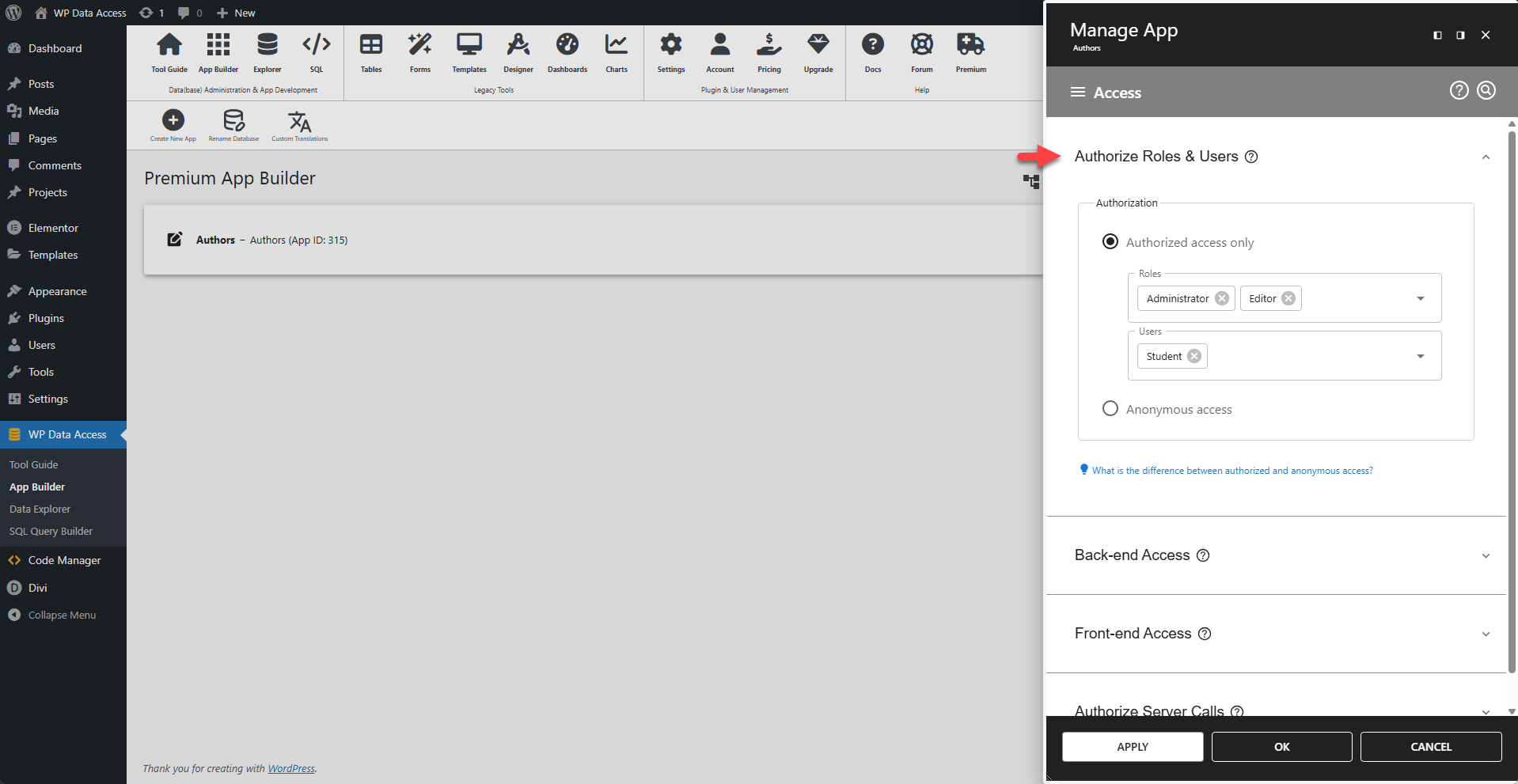
Configure which users are allowed to use the app.
🌐 Access Scope
- Applies to both back-end and front-end:
- Back-end: Restricted to registered users only.
- Front-end:
- 📋 Data Table Apps: Typically allow anonymous access (public viewing).
- 📝 Data Administration Apps: Usually require authorization to prevent unauthorized edits.
🔒 Authorized Access Only
- Who can access?
- Logged-in users with specified roles.
- Explicitly selected users.
🌍 Anonymous Access
- Who can access?
- All users (logged-in and logged-out).
Back-end Access
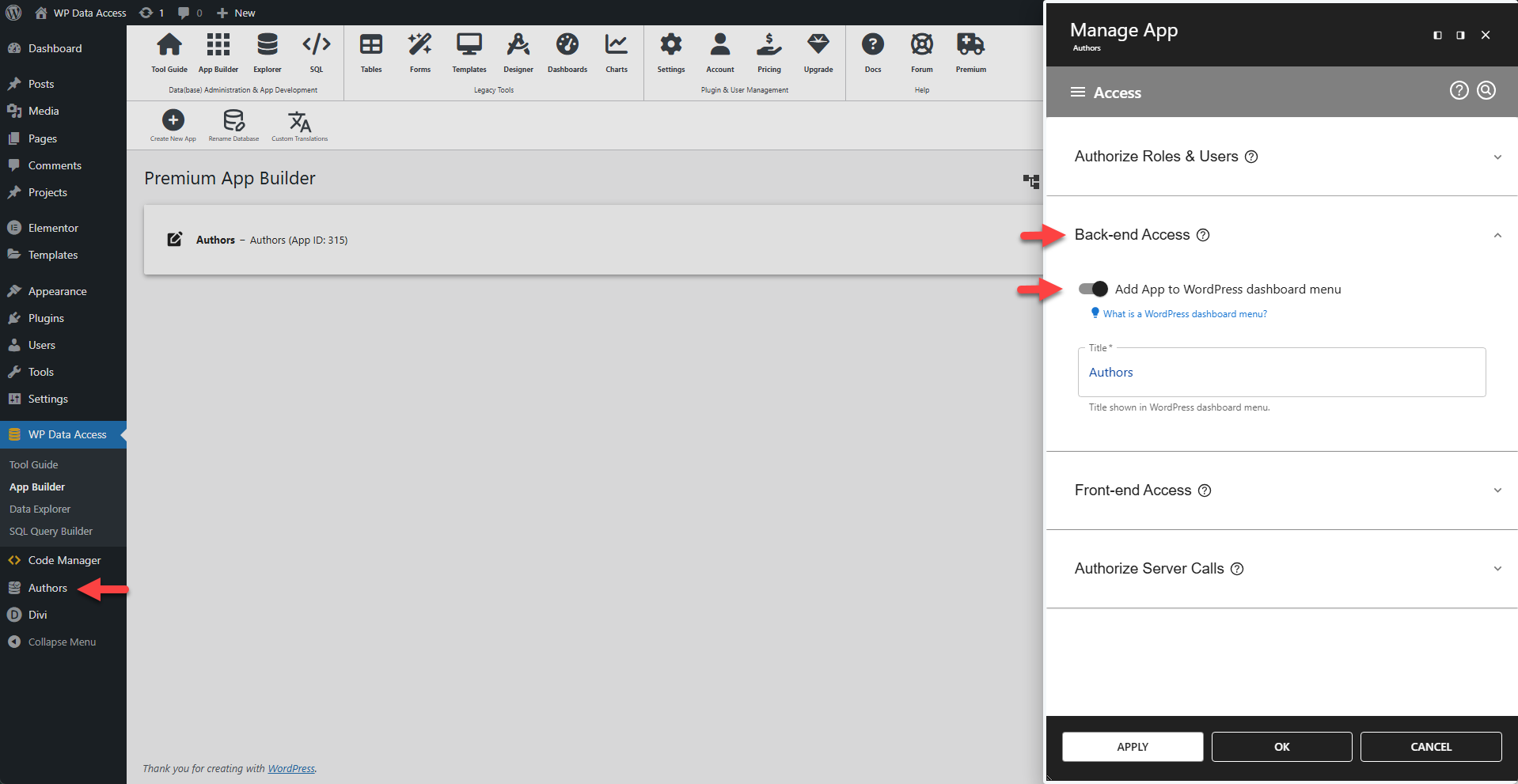
Allows authorized users to access the app directly from their WordPress dashboard.
When enabled, the app appears on the authorized users' dashboards with the specified title. A corresponding front-end menu item will also be created, as shown in the screenshot.
📌 With "Start in full-screen mode" enabled and "Enable full-screen support" disabled in App Info Settings (see here), the app behaves like a full-screen app and forces the user to log in via the WordPress login page. Please note that the user must navigate to a different URL to exit the app.
💡 Administrators have full access to all apps by default. However, to display an app on an administrator's dashboard, you must explicitly authorize their role or username.
Front-end Access
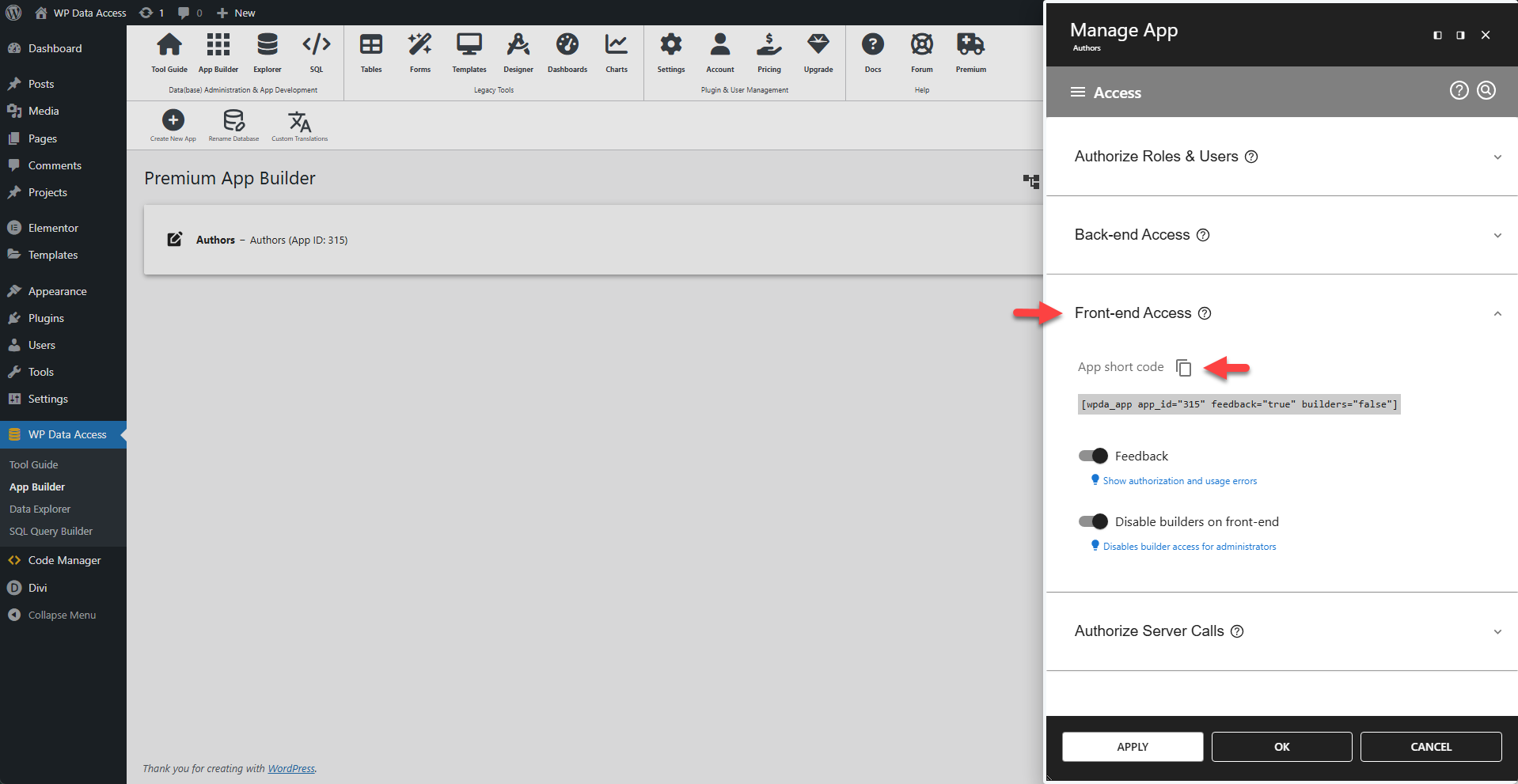
Embeds an app on any page using a shortcode.
Enable the desired options, copy the generated shortcode and paste it into your page.
📌 Use the WP Data Access App Gutenberg Block in the Gutenberg block editor alternatively.
💬 Enable Feedback
Authorization and usage errors are hidden by default to prevent errors from appearing on front-end pages for unauthorized users. If you want to display authorization and usage errors, enable feedback.
🚫 Disable Builders
Builder access is automatically enabled on front-end pages for administrators, allowing them to change app settings directly. Disabling builder access will remove all Table Builder and Form Builder icons from these pages. Please note that anonymous users and non-admin users cannot see these builder icons and have no access to app settings.
✖ Hide Title Bar
You can hide the title bar for data tables, data administration apps, maps, charts, and registration forms. For data apps, the title bar cannot be hidden, as this would also remove the app's navigation.
⛶ Fullscreen
Apps can be launched in full-screen mode (this feature is not available for maps).
Progressive Web App
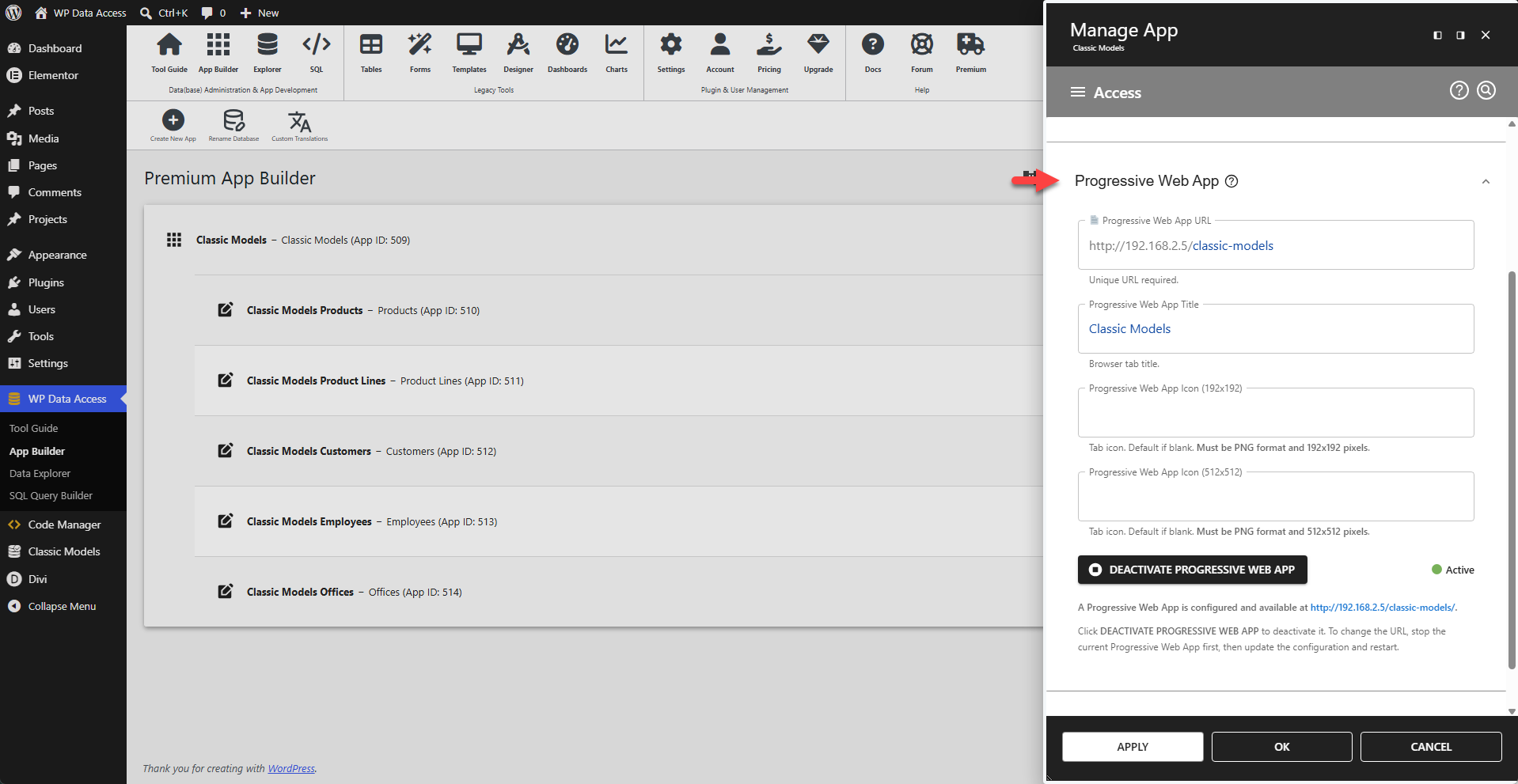
Lets your app behave like a native mobile app.
A Progressive Web App (PWA) is a website that looks and behaves like a native mobile app. (read more...) Running a WP Data Access app as a WPA requires just a few steps on your part.
⚙️ Progressive Web App URL
Enter a unique URL. Your domain is already added to the data entry field. You just need to add a path. Make sure the path does not already exist! Check this before you save your settings.
⚙️ Progressive Web App Title
Enter a meaningful title for your PWA.
⚙️ Progressive Web App Icon (192x192)
A PWA needs an icon. You can add your own custom icon here, in 192x192 format. If you leave this field blank, the plugin uses the default WP Data Access icon.
⚙️ Progressive Web App Icon (512x512)
This is the same as the previous field, but requires a different format: 512×512.
🟢 Activating a PWA
Once a URL and title are saved, the ACTIVATE PROGRESSIVE WEB APP button becomes available. Click this button to activate the PWA.
🔴 Deactivating a PWA
To deactivate a PWA, click the DEACTIVATE PROGRESSIVE WEB APP button.
Authorize Server Calls
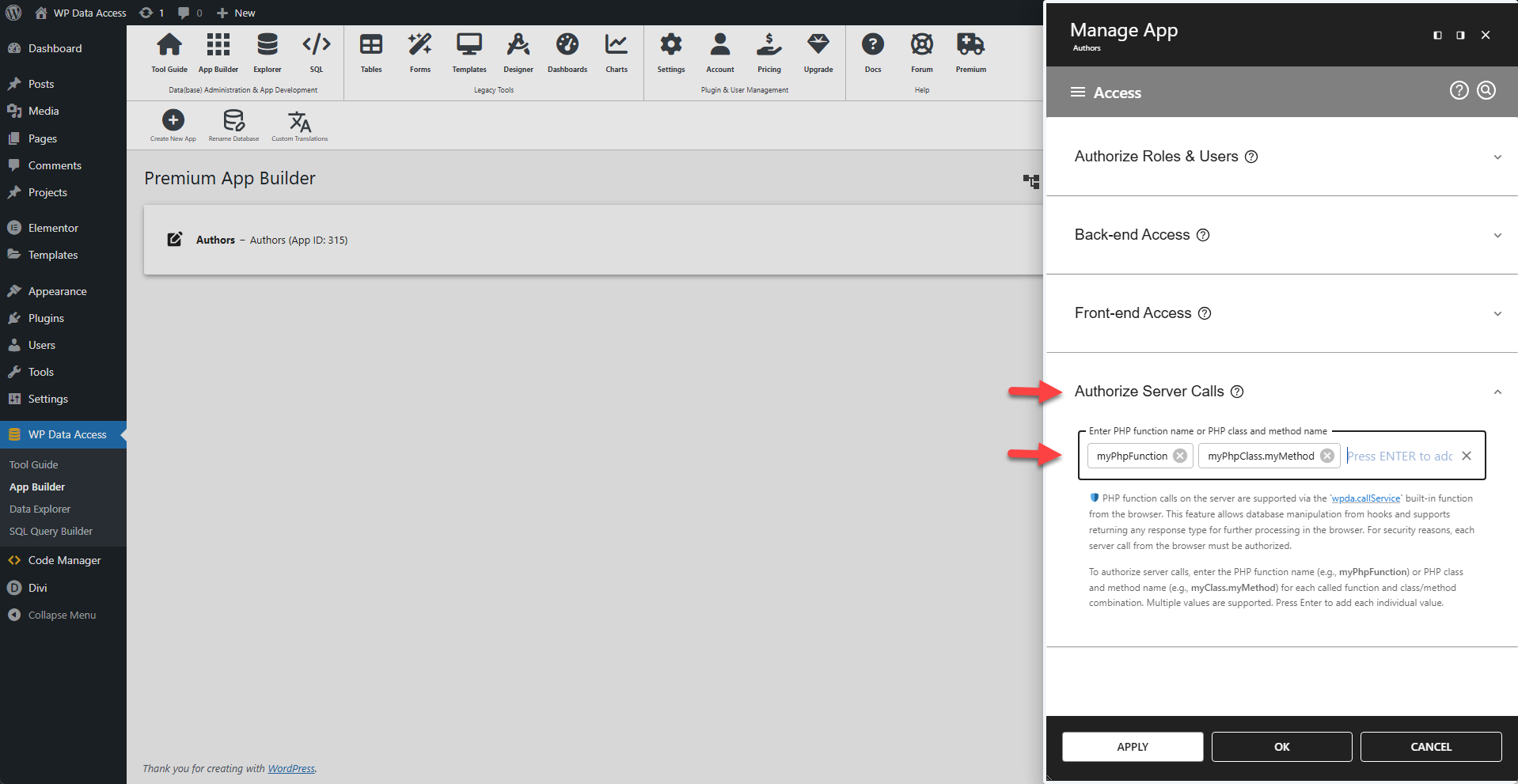
Authorize PHP function calls on the server from client-side hooks.
🛡️ PHP function calls on the server are supported via the wpda.callService built-in function from the browser. This feature allows database manipulation and other server-side tasks from hooks and supports returning any response type for further processing in the browser. For security reasons, each server call from the browser must be authorized.
✨ Examples
To authorize server calls, enter the PHP function name (e.g., myPhpFunction) or PHP class and method name (e.g., myClass.myMethod) for each called function and class/method combination.
📌 Multiple values are supported. Press ENTER to add each individual value.