Appearance
Aggregations
This panel is only available for numeric columns and computed fields.
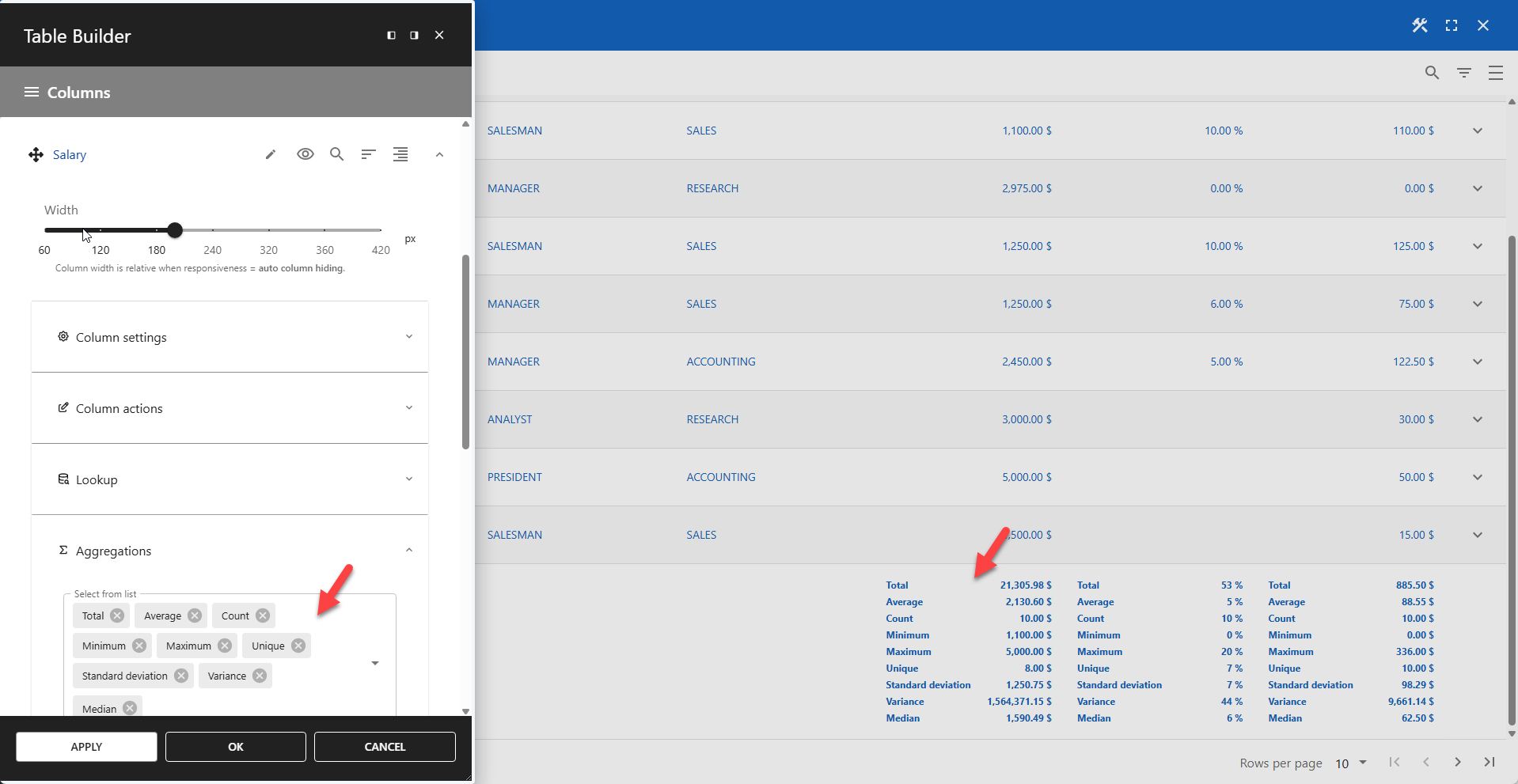
Aggregations are operations that combine multiple rows of data into a single summary value. The results of these calculations are displayed in the table footer.
Aggregate Functions
The following aggregate functions can be applied to a column:
- Total: Calculates the sum of all values in a numeric column.
- Maximum: Finds the highest value in a column.
- Minimum: Finds the lowest value in a column.
- Average: Computes the mean value of a numeric column.
- Count: Counts the number of non-null values in a column.
- Unique: Counts the number of distinct values in a column.
- Standard Deviation: Measures the amount of variation or dispersion in a set of values.
- Variance: Quantifies how much the values in a set differ from the mean (average) value. It is calculated as the average of the squared differences from the mean.
- Median: The middle value in a sorted list of values. For an odd number of values, it is the central value; for an even number, it is the average of the two middle values.
Adding Aggregations
- Expand the Aggregations panel.
- Select one or more aggregations from the list.
- Save your settings.
📌 Aggregations are displayed in the order they are added.